


Football match events webhook
Receive every goal, card, substitution, kick-off, half-time and full-time of the leagues, teams, players or matches you choose as a JSON POST request to your own URL. There's nothing to poll and no API key: we call your endpoint when we record the event.
Use it to feed your own bot, a stream overlay, a spreadsheet or a home automation. In the app, this destination is called "HTTP server".
What you get
One HTTP POST request per event, for the events you pick:
- Kick-off
- Goals, with the scorer and the assist when our data has them
- Yellow and red cards
- Substitutions
- Half-time score
- Full-time result
- For a league or a team: new YouTube videos and Shorts from the channels we track for it
Follow a whole league, one team, one player or a single match. A league covers all its matches. A player gets only the events that name them: goals, assists, cards and substitutions. A single match stops by itself after the final whistle.
The body is the event itself, with the same fields for every type, so one handler covers them all.
Example request
A goal, as your endpoint receives it (example values; field order may vary):
POST /hooks/9f2c51e7a4 HTTP/1.1
Content-Type: application/json

{
  "eventId": "6f1d2c3e-8a4b-4c5d-9e6f-7a8b9c0d1e2f",
  "matchId": "1234567",
  "type": "goal",
  "country": "England",
  "countryId": "44",
  "countryLogo": "https://example.com/flags/england.png",
  "league": "Coastal League",
  "leagueId": "300",
  "leagueLogo": "https://example.com/logos/coastal-league.png",
  "matchStadium": "Riverside Park",
  "matchReferee": "M. Keller",
  "teamHome": "Riverside FC",
  "teamHomeId": "5001",
  "teamHomeBadge": "https://example.com/badges/riverside-fc.png",
  "teamHomeScore": "1",
  "teamAway": "Northbridge Athletic",
  "teamAwayId": "5002",
  "teamAwayBadge": "https://example.com/badges/northbridge-athletic.png",
  "teamAwayScore": "0",
  "time": "31",
  "score": "1 - 0",
  "side": "home",
  "player1": "J. Moreno",
  "player1Id": "70001",
  "player2": "L. Okafor",
  "player2Id": "70002",
  "card": "",
  "timestamp": { "_seconds": 1792855872, "_nanoseconds": 512000000 }
}
Set it up
1. Build an endpoint
Your endpoint must accept a POST request with a JSON body and answer with a 2xx status. Here is a minimal version in Node.js, with a hard-to-guess path that acts as a secret:
import http from "node:http";

http.createServer((req, res) => {
  if (req.method !== "POST" || req.url !== "/hooks/9f2c51e7a4") return res.writeHead(404).end();
  let body = "";
  req.on("data", (chunk) => (body += chunk));
  req.on("end", () => {
    const event = JSON.parse(body);
    if (event.type === "goal") console.log(`${event.player1} scores: ${event.teamHome} ${event.score} ${event.teamAway}`);
    res.writeHead(204).end();
  });
}).listen(8080);
Deploy it on a public HTTPS address.
2. Create the integration
- Sign in on Football Live Score and open the page of the league, team, player or match you want to follow.
- Select Create integration, give it a name and choose HTTP webhook as the destination.
- Paste your endpoint's address in Webhook URL and select Send test message. Your endpoint receives a request whose body is only {"type": "✅ Football Live Score: your integration works."}. Answer it with a 2xx status and the test passes.
- Pick the events. Goal is already selected.
- Select Create integration.
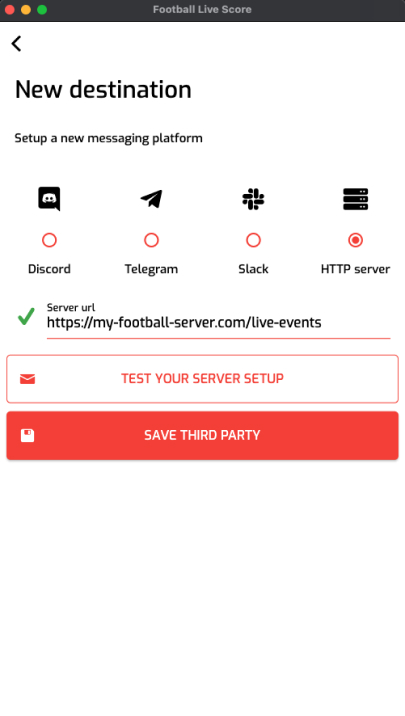
In the app, tap the broadcast button on a match, team, league or player screen, add HTTP server as a destination with the same URL, then pick the events and start the broadcast.
Payload fields
Every request has the same fields. All values are strings, except timestamp and, on YouTube events, post. A field that doesn't apply to the event is an empty string.
- eventId: unique ID of the event. If two of your integrations cover the same event, both requests carry the same eventId, so you can drop duplicates.
- type: match_started, match_half_time, match_ended, goal, card, substitution, youtube or youtube-short.
- matchId: the match ID (empty on YouTube events).
- country, countryId, countryLogo: the competition's country, its ID and its flag URL.
- league, leagueId, leagueLogo: the competition's name, ID and logo URL.
- matchStadium, matchReferee: stadium and referee, when known.
- teamHome, teamHomeId, teamHomeBadge, teamHomeScore: the home team's name, ID, badge URL and current score.
- teamAway, teamAwayId, teamAwayBadge, teamAwayScore: the same for the away team.
- time: the minute of a goal, card or substitution, as our data feed writes it.
- score: the score as "home - away", for example "1 - 0". For a goal, the score after that goal.
- side: home or away, meaning the team that scored, got the card or made the change.
- player1, player1Id: the scorer, the booked player, or the player coming on.
- player2, player2Id: the player who gave the assist (empty if none), or the player going off.
- card: the card as our data feed names it, for example "yellow card" or "red card".
- timestamp: when we recorded the event, as an object with _seconds (Unix time) and _nanoseconds.
- post: on YouTube events only, the video, including post.youtubeData.title, post.youtubeData.url and post.channelDisplayName.
Delivery
- Format: a POST request with Content-Type: application/json and the event as its body. One request per event and integration, never batched.
- Success: any 2xx status. A 4xx or 5xx status, or a connection error, counts as a failure.
- No retries: a failed delivery isn't sent again. It appears as an error in the integration's log.
- Repeated failures: after several failures in a row, the integration switches to Error and stops sending. A successful delivery resets the count.
- Order: requests are sent independently, so two events from the same minute can arrive in either order.
- Security: requests aren't signed and carry no token. Use an HTTPS address with a long random part, as in the example, and ignore requests to any other path.
- Test request: the test button sends only the type field, so make sure your handler accepts a body without the other fields.
Questions
Do I need an API key?
No. You give us a URL. There's no key to request, rotate or send.
Can I receive only goals?
Yes. Pick only Goal when you create the integration. You can change the events later with Edit.
Why did I receive the same goal twice?
Probably because two of your integrations cover it, for example one for the league and one for the team. Each sends the event, with the same eventId. Dropping repeated eventIds handles this, and the rare repeated delivery too.
Is this the same as the "HTTP server" destination in the app?
Yes. The app calls it "HTTP server" and the website calls it "HTTP webhook". Both send the same request.
How quickly do messages arrive?
As soon as our live data has the event: expect the message within a few minutes.
How do I pause or delete an integration?
On the website, open your account, then Integrations. Each integration shows its status, how many messages were sent or failed, a log of recent deliveries, and buttons to pause, edit or delete it. In the app, your broadcasts are in the account tab.
What happens after the final whistle?
An integration that follows a single match stops by itself after full time. League, team and player integrations keep going, match after match, until you pause or delete them.
Which competitions can I follow?
Every league and cup on our coverage page.
Does it cost anything?
Integrations are free at the moment. A subscription may come later.
Other integrations
Guides: How to start a broadcast · Message placeholders