


Live football alerts for your Discord server
Post the goals, cards and results of the teams you follow in a channel of your Discord server while the match is on. It works through a channel webhook, so there's no bot to invite and no access to the rest of your server.
Choose a single match, a team, a player or a whole league, pick the events and write the messages your members will see.
What you get
A message in your channel for each event you pick:
- Kick-off
- Goals, with the scorer and the assist when our data has them
- Yellow and red cards
- Substitutions
- Half-time score
- Full-time result
- For a league or a team: new YouTube videos and Shorts from the channels we track for it
Follow a whole league, one team, one player or a single match. A league covers all its matches. A player gets only the events that name them: goals, assists, cards and substitutions. A single match stops by itself after the final whistle.
Each message shows the name you choose, and its picture can follow the match: the league logo or a team badge (see "Team badges as the avatar" below). Typical uses: a goal channel for a club's fan server, or a results channel for a league your server plays fantasy in.
Example messages
With the default messages, a match looks like this in your channel:
🚀 Riverside FC vs Northbridge Athletic (Coastal League) has started in: Riverside Park. Referee: M. Keller
⚽ Goal from J. Moreno for Riverside FC with a pass from L. Okafor: 1 - 0, 31m
🟨 Yellow card for T. Brandt from Northbridge Athletic
⏸️ Half Time! Riverside FC leads against Northbridge Athletic: 1 - 0
↔️ Riverside FC: S. Ilic stands in for J. Moreno. 63m
🏁 Riverside FC defeats Northbridge Athletic: 1 - 0
The teams and players are made up for this example.
Set it up
You need the Manage Webhooks permission on the server. Server owners and admins have it.
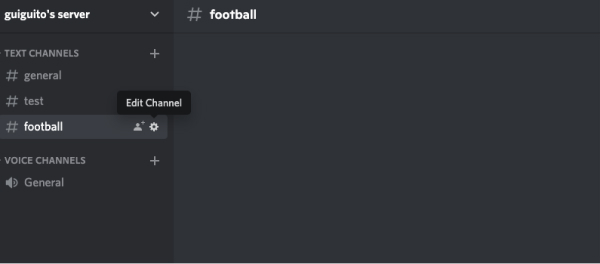
1. Open the channel settings
In Discord, hover over the text channel that should get the messages and select the cog (Edit Channel).
2. Create a webhook
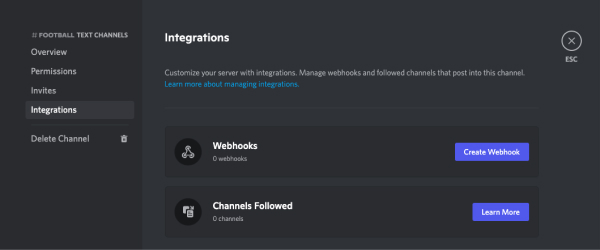
Go to Integrations, then Webhooks, and select New Webhook. The name you give it here is replaced by the username you set on Football Live Score. Its picture is used unless you set an avatar URL.
3. Copy the webhook URL
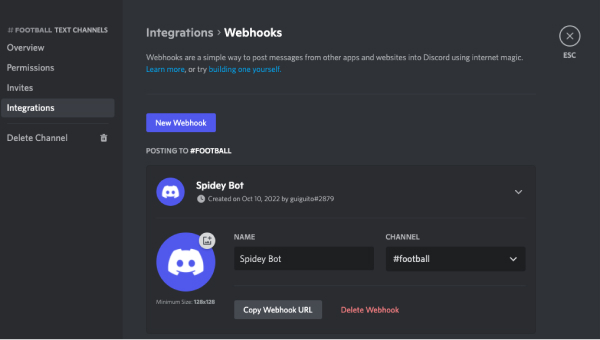
Select Copy Webhook URL. The address starts with https://discord.com/api/webhooks/.
4. Create the integration
- Sign in on Football Live Score and open the page of the league, team, player or match you want to follow.
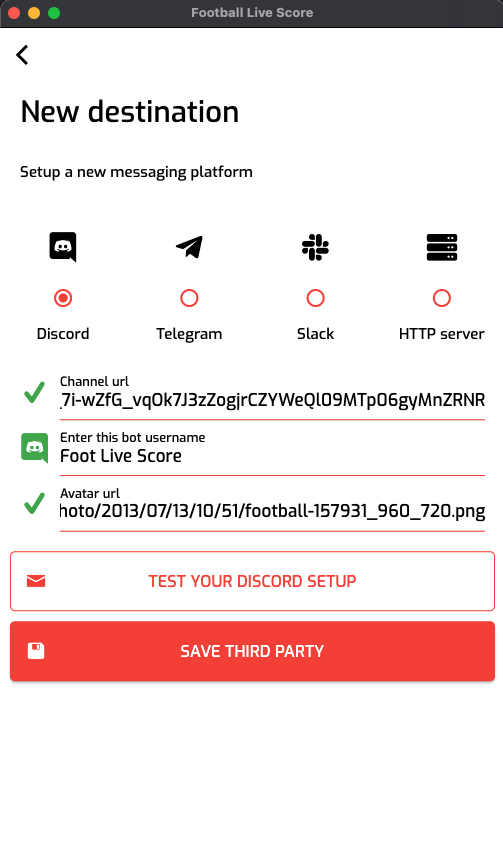
- Select Create integration, give it a name and choose Discord as the destination.
- Paste the Webhook URL and enter a Username: the name shown on each message, for example Riverside Goals. The Avatar URL is optional.
- Select Send test message. It should appear in the channel within a few seconds.
- Pick the events. Goal is already selected.
- Edit the messages if you like, then select Create integration. Tick Save this destination for next time to reuse this channel for another team or league.
In the app, tap the broadcast button on a match, team, league or player screen, add Discord as a destination with the same webhook URL, then pick the events and start the broadcast.
Team badges as the avatar
The Avatar URL field accepts four placeholders, replaced on every message:
- {picture_league}: the competition's logo
- {picture_team_home}: the home team's badge
- {picture_team_away}: the away team's badge
- {picture_country}: the country's flag
Put {picture_league} in the field, and each message shows the logo of the competition it comes from.
Customise the messages
Each event has its own message template, with placeholders that are filled in when the event happens. On the website, the default messages are in the language of the page you're on, and you can rewrite them in any language.
Add several templates for the same event and one is picked at random each time, so the channel doesn't repeat the same line all match.
Common placeholders: {home_team}, {away_team}, {league}, {score}, {time}, {scorer}, {assist}, {team_scoring}, {player_card}, {team_card}, {player_entering}, {player_leaving}, {winner}, {loser}. The full list is in the message customisation guide.
Template: ⚽ GOAL! {scorer} ({time}') — {home_team} {score} {away_team}
Message:  ⚽ GOAL! J. Moreno (31') — Riverside FC 1 - 0 Northbridge Athletic
Questions
Do I have to invite a bot to my server?
No. Messages go through a webhook that belongs to one channel. There's nothing to authorise, and it can't read or post anywhere else.
Can I post in several channels or servers?
Yes. Create a webhook in each channel and one integration per webhook. Tick Save this destination for next time to reuse a webhook for other teams or leagues.
The test message doesn't arrive. What should I check?
Check that you pasted the whole webhook URL, starting with https://discord.com/api/webhooks/, that the Username field isn't empty, and that the webhook still exists in the channel settings.
What if a lot happens at once?
If Discord asks us to slow down, we wait and send the message again.
How quickly do messages arrive?
As soon as our live data has the event: expect the message within a few minutes.
How do I pause or delete an integration?
On the website, open your account, then Integrations. Each integration shows its status, how many messages were sent or failed, a log of recent deliveries, and buttons to pause, edit or delete it. In the app, your broadcasts are in the account tab.
What happens after the final whistle?
An integration that follows a single match stops by itself after full time. League, team and player integrations keep going, match after match, until you pause or delete them.
Which competitions can I follow?
Every league and cup on our coverage page.
Does it cost anything?
Integrations are free at the moment. A subscription may come later.
Other integrations
Guides: How to start a broadcast · Message placeholders